Edit Any GitHub File and Open a Pull Request in Your Browser (2026)
You do not need to clone a repo, install an editor, or learn the command line to fix a GitHub file. With DraftView's Edit any page flow, you paste a file URL, edit it in a real editor, and open a pull request from your own GitHub account, on a phone, an iPad, or a desktop. Free for public repos.
There are three normal ways to change a file in a GitHub repository, and each one has a tax.
You can clone the repo, which means git, a terminal, and a local checkout you have to keep in sync. You can use GitHub's web file editor, which is a plain textarea with no preview, no formatting help, and a fork prompt the moment you are not a maintainer. Or you can install a desktop editor and a docs toolchain, which is a lot of setup for what is often a one-line fix.
For a developer at their own machine, the clone path is fine. For everyone else (a writer on a laptop they did not configure, a subject matter expert on an iPad, anyone who spotted a typo while reading the docs on their phone), every one of those paths is friction that ends with the change never getting made.
DraftView's Edit any page flow removes the tax. You paste a GitHub file URL, edit the file in a real editor in your browser, and open a pull request from your own GitHub account. No clone, no install, no command line. This post walks through how it works and why it works on any device you happen to have.
One URL, any file
The editor accepts any github.com/<owner>/<repo>/blob/<branch>/<path> link. Both /blob/ (the view URL) and /edit/ (GitHub's editor URL) forms work, so you can paste whichever you have. Supported documentation formats are Markdown (.md), MDX (.mdx), and AsciiDoc (.adoc / .asciidoc).
The fastest way in is to prepend the editor URL to the GitHub link:
https://draftview.app/edit?url=https://github.com/YOUR_ORG/YOUR_REPO/blob/main/docs/page.md
That is the whole setup. The file opens in an editor immediately. Reading and editing require no account. You only sign in at the very end, when you are ready to turn your changes into a pull request.
No installation, no dedicated editor
There is nothing to install. No CLI, no git client, no Node, no Ruby, no VS Code extension, no documentation build pipeline. The editor runs in the browser tab you already have open.
That matters more than it sounds. The reason most documentation never gets corrected by the people best placed to correct it is that the setup cost is higher than the value of the fix. A product manager is not going to install a Ruby toolchain to fix one sentence. A support engineer is not going to clone a 2 GB monorepo to correct a wrong flag name. When the cost of contributing drops to "paste a URL," those fixes actually happen.
You also get a real editor rather than a textarea. DraftView ships two modes you can switch between at any time:
- Visual mode renders the document the way it will publish: headings look like headings, lists like lists, bold and links behave like a word processor. This is the mode for people who do not want to think about Markdown or AsciiDoc syntax at all.
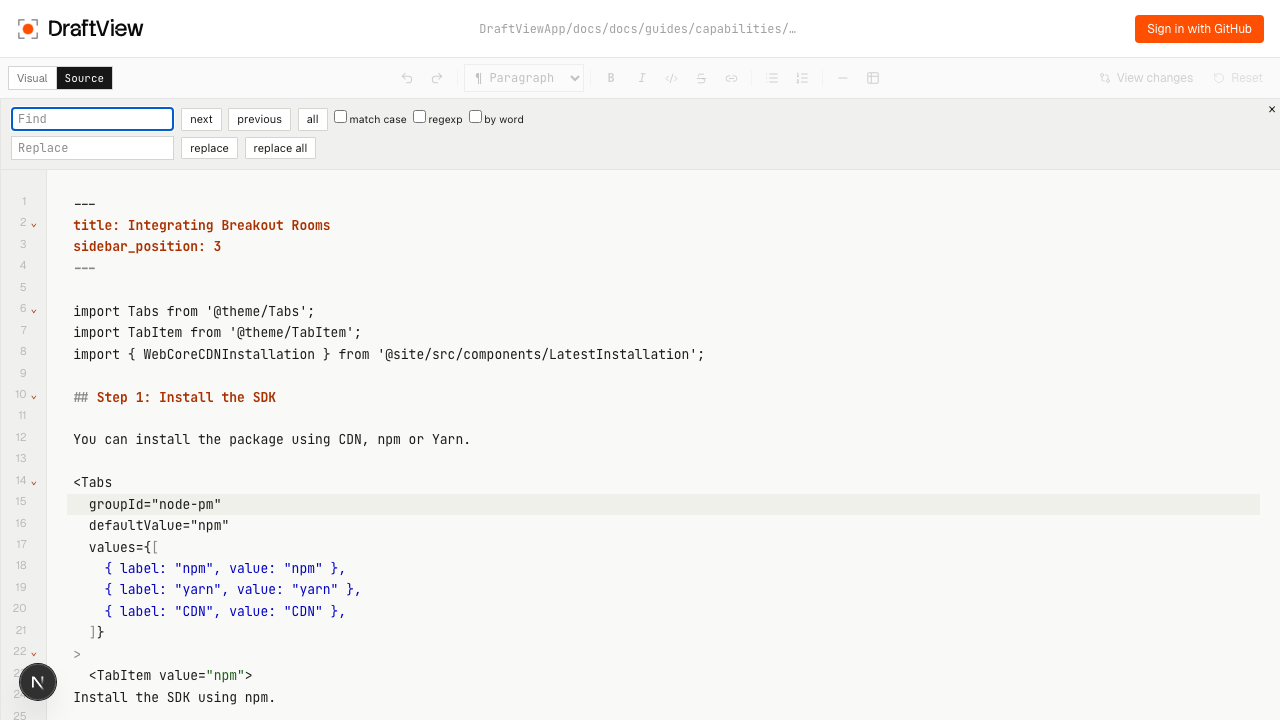
- Source mode is a full CodeMirror editor with syntax highlighting, line numbers, code folding, find and replace, multi-cursor, and the keyboard shortcuts you already know from VS Code. This is the mode for structural edits and for developers who prefer source-first.
Works on your phone, iPad, and desktop
Because the editor is a web app and not a desktop install, it runs wherever a browser does. The same draftview.app/edit?url=… link works on a desktop, a laptop, an iPad, or a phone.
This is the part the clone-and-CLI workflow can never match. You cannot reasonably run git clone and a build toolchain on an iPad. You can read your docs on a phone, notice that a step is wrong, tap the edit link, fix it, and open a PR before you have put the phone down. The editor adapts its layout to the screen, so visual mode stays usable on a narrow viewport and source mode keeps its highlighting and gutter.
For teams, this changes who can contribute. The reviewer who only ever opens their laptop for meetings, the SME who lives on a tablet, and the engineer fixing docs from their phone on a commute all get the same path to a pull request.
Your GitHub account, your pull request
When you click submit, DraftView signs you in with GitHub OAuth and opens the pull request as you, from your own account. It is not a DraftView bot posting on your behalf and not a shared service account. The commit author and the PR are yours, so the maintainer sees a normal contribution from a real GitHub user and reviews it the way they review everything else.
Behind the scenes, if you do not have write access, DraftView forks the repository to your account, commits your change to a branch, and opens the PR from the fork: exactly the flow an experienced contributor would do by hand, without you touching git. The OAuth scope is the minimum needed to fork and open the PR, and your repository stays the single source of truth. There is no parallel CMS and no separate copy of your content to drift out of sync.
Free for public repositories
Reading and editing are always free. Opening pull requests is free forever, for public and private repositories alike: the full editor, both visual and source modes, and the PR flow all work without a paid plan.
There is no per-seat cost for the people fixing typos and no CMS subscription to maintain. The whole point is to make the lowest-value, highest-friction edits (the ones that normally never get made) cost nothing.
Who this is for
- Drive-by contributors who notice a broken sentence while reading your docs and want the shortest possible path from "I spotted a typo" to "here is a PR."
- Technical writers who need to edit from any browser on any device, without a local checkout or build environment.
- Subject matter experts and PMs who can fix or improve content in visual mode without learning Markdown or AsciiDoc syntax.
- Developers who want a real source editor with the shortcuts they know, for a quick fix they would rather not clone the repo for.
- Documentation site owners who want to point their site's "Edit this page" link at a flow that actually produces pull requests. The edit-this-page integration guide has copy-paste snippets for Docusaurus, VitePress, MkDocs, Starlight, and Astro.
If your edit is to an AsciiDoc file that pulls in other files through include:: directives, there is more to say: DraftView resolves and opens every included file too. That is covered in A Free Online AsciiDoc Editor That Opens Your Includes Too. For a full walkthrough of both editor modes across Markdown, MDX, and AsciiDoc, see Edit Any Markdown, MDX, or AsciiDoc File from GitHub in Your Browser.
Fix a GitHub file in 30 seconds.
Paste any file URL from a public GitHub repository, edit it visually or in source, and open a pull request from your own account. No clone, no install, works on any device.
Try the editorFree for public repos. 14-day trial on private repos, no credit card required.
Resources
- ProseLint Web: Free browser-based Vale prose linter for style guides.
- Markdown Editor: Free online Markdown and MDX editor with live preview.
- Docs Review Compare Index: Compare DraftView with Google Docs, Confluence, and GitHub.
- DraftView Trial: Start reviewing documentation PRs visually with a public GitHub pull request.